Shipping Label
A courier waybill for logistics and warehouse operations: a branded header with service level, a linear barcode plus the human-readable tracking number, a prominent destination block (the address a courier actually reads first), handling badges, and a package-details/QR footer – the shape of a real-world 4x6” label rather than a generic business document.
Template — shipping_label.craft
<Document>
<Settings>
<Page size="A5" orientation="portrait"/>
<SectionRatios header_ratio="0.02" body_ratio="0.88" footer_ratio="0.02"/>
</Settings>
<Header margin_left="0" margin_right="0" margin_top="0" margin_bottom="0"
background_color="#1B2631" padding="16">
<Layout orientation="horizontal">
<Layout orientation="vertical" weight="0.62">
<Text font_size="17" style="bold" color="white">${carrier_name}</Text>
<Text font_size="8" color="#AEB6BF">${carrier_tagline}</Text>
</Layout>
<Rectangle weight="0.38" margin_top="7" background_color="#E67E22" padding="5">
<Text alignment="center" font_size="11" style="bold" color="white">${service_type}</Text>
</Rectangle>
</Layout>
</Header>
<Body margin_left="16" margin_right="16" margin_top="12" margin_bottom="10">
<Text alignment="center" font_size="7.5" style="bold" color="#95A5A6">TRACKING NUMBER</Text>
<Text alignment="center" font_size="14" style="bold" color="#1B2631">${tracking_number}</Text>
<Blank/>
<Layout orientation="horizontal" weights="29,330,29">
<Text> </Text>
<Image src="${barcode}" width="330" height="98"/>
<Text> </Text>
</Layout>
<Blank/>
<Line x1="0" y1="0" x2="388" y2="0" border_color="#BDC3C7" border_width="1"/>
<Blank/>
<Text font_size="8" style="bold" color="#7F8C8D">DELIVER TO</Text>
<Rectangle padding="9" background_color="#FDEBD0" border_color="#E67E22" border_width="1.5">
<Text font_size="13.5" style="bold" color="#1B2631">${receiver_name}</Text>
<Text font_size="10" color="#1B2631">${receiver_address}</Text>
<Text font_size="11" style="bold" color="#1B2631">${receiver_city}</Text>
<Text font_size="9" color="#7F8C8D">Tel. ${receiver_phone}</Text>
</Rectangle>
<Blank/>
<Layout orientation="horizontal">
<Text weight="0.14" font_size="8" style="bold" color="#7F8C8D">FROM</Text>
<Text weight="0.86" font_size="8.5" color="#5D6D7E">${sender_name} — ${sender_address}, ${sender_city}</Text>
</Layout>
<Blank/>
<Layout orientation="horizontal" spacing="8">
<Rectangle weight="1" padding="6" background_color="white" border_color="#1B2631" border_width="1">
<Text alignment="center" font_size="8" style="bold" color="#1B2631">FRAGILE</Text>
</Rectangle>
<Rectangle weight="1" padding="6" background_color="white" border_color="#1B2631" border_width="1">
<Text alignment="center" font_size="8" style="bold" color="#1B2631">THIS SIDE UP</Text>
</Rectangle>
<Rectangle weight="1" padding="6" background_color="#E67E22" border_color="#E67E22" border_width="1">
<Text alignment="center" font_size="8" style="bold" color="white">${delivery_speed}</Text>
</Rectangle>
</Layout>
<Blank/>
<Blank/>
<Layout orientation="horizontal" weights="233,10,145">
<Rectangle weight="233" padding="8" background_color="#ECF0F1" border_color="#BDC3C7" border_width="0.5">
<Table model="vertical">
<TBody>
<Row>
<VTitle font_size="7.5" style="bold" color="#7F8C8D">WEIGHT</VTitle>
<Cell><Text font_size="8.5">${weight}</Text></Cell>
</Row>
<Row>
<VTitle font_size="7.5" style="bold" color="#7F8C8D">DIMENSIONS</VTitle>
<Cell><Text font_size="8.5">${dimensions}</Text></Cell>
</Row>
<Row>
<VTitle font_size="7.5" style="bold" color="#7F8C8D">PIECES</VTitle>
<Cell><Text font_size="8.5">${pieces}</Text></Cell>
</Row>
<Row>
<VTitle font_size="7.5" style="bold" color="#7F8C8D">SHIP DATE</VTitle>
<Cell><Text font_size="8.5">${ship_date}</Text></Cell>
</Row>
<Row>
<VTitle font_size="7.5" style="bold" color="#7F8C8D">ETA</VTitle>
<Cell><Text font_size="8.5">${eta}</Text></Cell>
</Row>
</TBody>
</Table>
</Rectangle>
<Text weight="10"> </Text>
<Layout weight="145" orientation="vertical">
<Text alignment="center" font_size="7" color="#95A5A6">SCAN TO TRACK</Text>
<Layout orientation="horizontal" weights="10,125,10">
<Text> </Text>
<Image src="${qr_code}" width="125" height="125"/>
<Text> </Text>
</Layout>
</Layout>
</Layout>
</Body>
<Footer margin_left="16" margin_right="16" margin_top="2" margin_bottom="6">
<Text alignment="center" font_size="6.5" color="#AEB6BF">${tracking_number} — generated with Docraft</Text>
</Footer>
</Document>
Note
Fixed-width children (the barcode, the QR code) are centered inside a
wider row by giving the flanking spacer <Text> nodes and the content
node weights that sum to exactly the row’s own width in points –
since <Layout weights="..."> divides its width by that ratio, matching
the sum to the container’s point width turns each share into a literal
point value instead of a proportion, e.g. weights="29,330,29" across a
388pt-wide row centers a 330pt-wide image with a precise 29pt margin on
each side.
Data — shipping_label.json
barcode and qr_code point at image files expected next to the
docraft_tool executable. Neither has to be a placeholder: barcode
here is a real Code128 barcode generated with python-barcode, and qr_code a real,
scannable QR code generated with qrcode (JSON has no comment syntax, so this
can’t be noted inline in the file itself):
{
  "carrier_name": "FastFreight Logistics",
  "carrier_tagline": "International Express Courier",
  "service_type": "EXPRESS",
  "tracking_number": "FF-2025-0039871-IT",
  "sender_name": "TechCraft Srl",
  "sender_address": "Via Roma 42",
  "sender_city": "20100 Milano (MI), Italy",
  "receiver_name": "Global Parts GmbH",
  "receiver_address": "Industriestr. 88",
  "receiver_city": "80333 München, Germany",
  "receiver_phone": "+49 89 9876543",
  "weight": "12.5 kg",
  "dimensions": "40 × 30 × 25 cm",
  "pieces": "2",
  "delivery_speed": "1–2 DAYS",
  "ship_date": "2025-03-08",
  "eta": "2025-03-10",
  "barcode": "barcode.png",
  "qr_code": "qr.png"
}
Usage
docraft_tool shipping_label.craft output/shipping_label.pdf --data shipping_label.json
Output Example
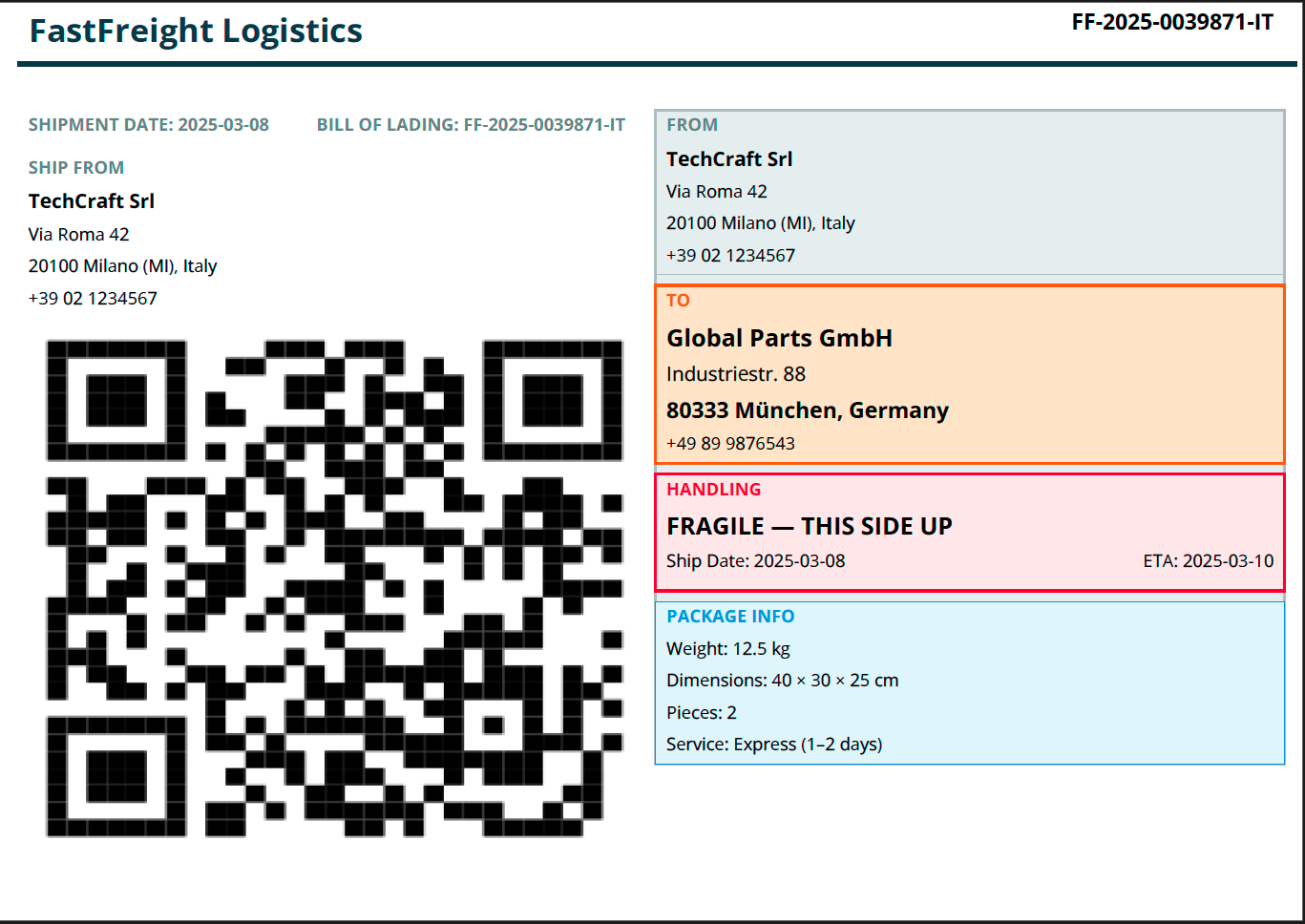
Note
The package-details/QR row is a horizontal <Layout> nested near the
bottom of the body. The current pagination pass moves that whole
<Layout> onto a second PDF page rather than keeping it on page 1
below the handling badges, even though the content itself fits well
within one page’s height – the image above is composited from both
pages to show the label as it’s designed to read. If you hit the same
“block moves to the next page even though it fits” pattern with your own
nested Layouts, that’s this same pagination behavior, not a mistake in
your markup.